Track all your app points and promo codes in one simple sheet
Keep every app points balance and promo code in one simple tracker. Spot expiring rewards, calculate their real value, and never miss a cashout again.
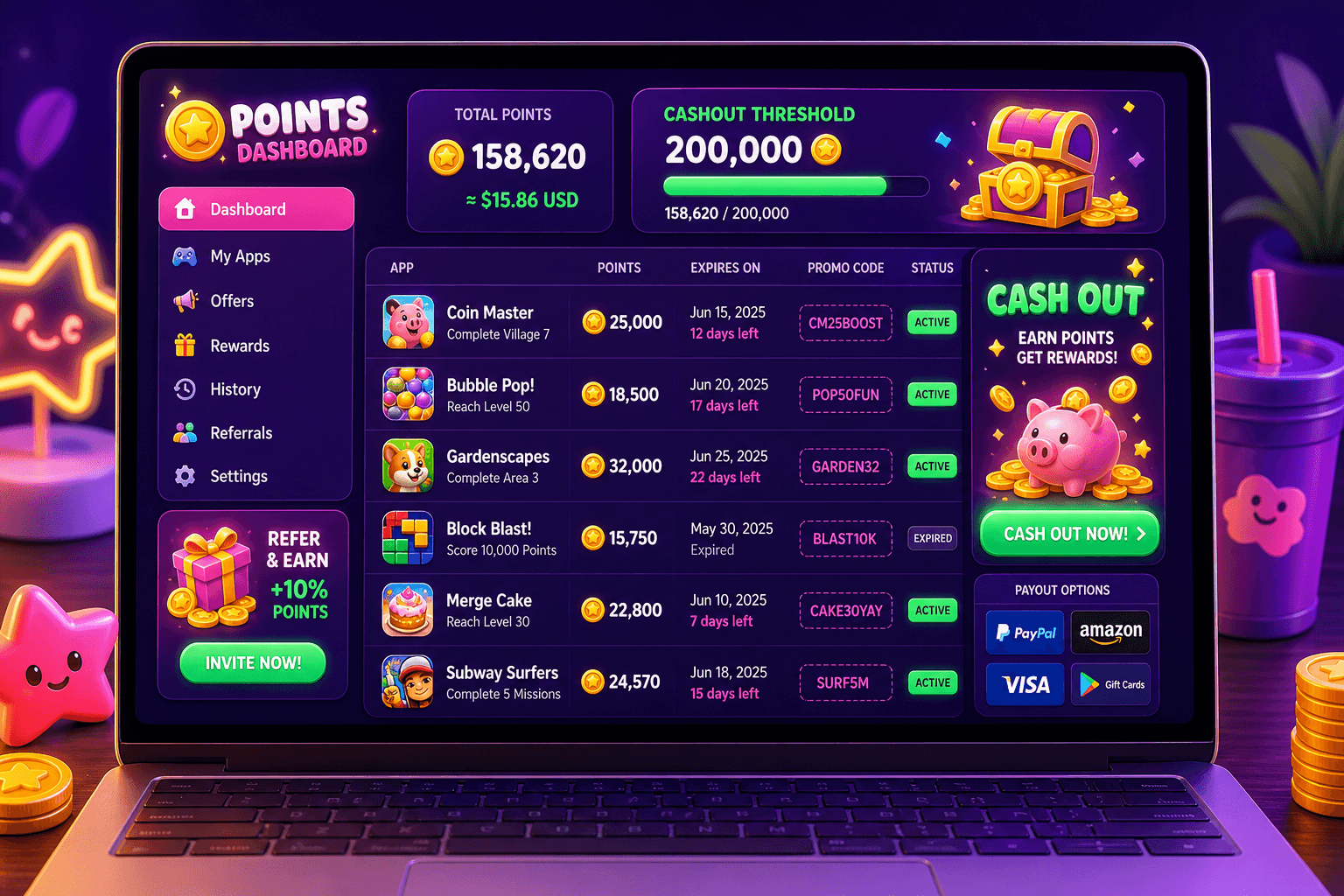
Stop losing value to forgotten points and promo codes. A single, well organized tracker turns scattered app rewards into predictable cash or gift cards you can actually use.
Why a single tracker helps
Most people use 5 to 12 reward apps. Points, promo codes, and short window offers pile up fast. Without a single place to check balances you miss expirations, double up on work, or fail to hit cashout thresholds.
A simple tracker does three things:
- Makes value visible: you can compare points across apps and decide where to focus.
- Prevents waste: expiration dates and single-use codes stay front of mind.
- Speeds cashouts: you know when an account is near a payout threshold so you can act.
If you use play-to-earn apps, include them in this same list. Playpot is one example: Playpot is a free play-to-earn rewards site. Play games, take surveys, and complete app offers to earn coins, then cash out real money via PayPal, Venmo, or Cash App. Tap. Play. Cash out.
What to track: the essential columns
Use Google Sheets, Excel, or Airtable. Start with these columns and keep each row to a single reward account or promo code.
- App name (example: Playpot)
- Account identifier (email, username, or just "main")
- Points or coins balance
- Cash value per point (if known) or conversion notes
- Estimated USD value (points times value per point)
- Minimum cashout threshold (example: $20)
- Expiration date
- Promo code (if applicable)
- Code expiry or usage limit
- Source or how you earned it (survey, daily login, referral)
- Last updated date
- Notes (rules, caps, payout methods such as PayPal, Venmo, Cash App, Zelle, gift cards)
Keep the rewardMethods and platforms in mind. For example, note that Playpot supports PayPal, Venmo, Cash App, Zelle, gift cards, and works on Web, iOS, Android, Desktop. That helps you plan where you can actually get cash out.

Put it in a sheet: step by step
- Create a new Google Sheet and name it something obvious, like "Rewards Tracker".
- Add the columns listed above in row 1. Freeze that header row so it stays visible.
- Enter each app and account on its own row. If you have multiple accounts on one app, give each a separate row.
- Add a formula for USD value when you know conversion. Example formula in Google Sheets: =C2 * D2 where C2 is points and D2 is value per point in USD.
- Use conditional formatting to highlight rows with expiration dates within 14 days, and rows where USD value is above your target.
Example conditional formatting rules:
- Expiration within 14 days: format red background
- USD value greater than or equal to minimum cashout: format green border
This gives you an at-a-glance list of what to act on right now.
How to calculate real value without mystery math
Many apps list points without saying exactly what those points are worth. If a site tells you their min cashout is $20, use that as a guide. For apps that exchange 10,000 points for $10, add that ratio into your sheet and let the sheet do the math.
Concrete routine:
- If an app requires 5,000 points to get $5, enter 5,000 in the points-needed field and set value per point to 5 / 5000 = 0.001.
- Your USD value column shows how close you are to a cashout threshold.
Realistic expectations: most legitimate reward apps pay modestly. Expect $10 to $150 per month for most users who put in casual time across multiple apps. Tracking keeps you focused on the accounts that give the best return for your effort.

Daily and weekly routines that save time
Make the tracker part of a short, repeatable habit.
- Quick daily check: 5 minutes to log new promo codes and update balances. Add a calendar reminder.
- Weekly tidy: 10 to 15 minutes to reconcile points, delete used codes, and mark items expiring soon.
- Monthly review: pick the top 2 apps by USD value and focus your earning time there.
Use filters to show only rows that are expiring, or only rows above your min cashout. That gives clear next steps when you sit down to redeem.
Security and sharing
Promo codes can be sensitive if they are one-time use. For codes that are personal or tied to your account, keep them in an encrypted notes field in your password manager instead of a public sheet.
If you need to share your tracker with a partner or friend, create a read-only link or export a PDF summary. Avoid sharing account credentials. For collaboration, use Google Sheets and restrict edit access.

A handy app for this
Foldr.space is a lightweight file sharing and hosting tool that makes it easy to send snapshots of a tracker or a spreadsheet without forcing people to sign up for a storage service. It is useful if you want to share a quick export of your rewards sheet, a folder of screenshots for accounts, or a one-off package of receipts when coordinating a payout with someone else.
Quick tips and a short checklist
- Start small: one sheet, one view, and add columns only when you need them.
- Keep a single source of truth: choose Google Sheets or Airtable and stick with it.
- Highlight expiration dates and cashout-ready accounts with conditional formatting.
- Use the USD value column to compare effort across apps, and prioritize the highest returns.
- Back up the file once a month, and keep sensitive codes in a secure notes app or password manager.
Wrap-up: a single tracker turns scattered app rewards into predictable wins. With a 10 minute setup and a 5 minute daily check, you stop leaving value on the table and start collecting real cash or gift cards on a schedule. Playpot and other reward apps become part of a system, not clutter in a notifications list. Tap. Play. Cash out.
Turn this into real money with Playpot
Play games, take surveys, and complete offers — earn from your very first one and cash out real money.
Play nowGet the best-paying offers by email
Drop your email and we will send the best-paying offers so you can start earning the moment you sign up.
We use your email to send the bonus code and occasional Playpot updates. Unsubscribe in one click.